Concepts in Mobile Dev, page 7
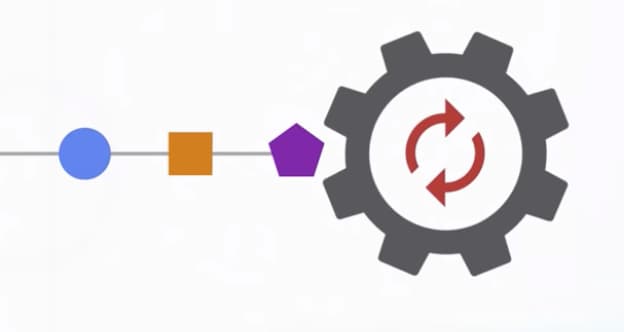
Dart's Microtask Queue vs. Event Queue
Dart's event loop prioritizes a 'microtask' queue for immediate async tasks over the main 'event' queue for I/O and user input. This ensures high-priority code runs first, but risks starving the event queue and freezing the UI if overused.

Android Studio Profiler: Find Your App's Bottlenecks
The Android Studio Profiler is your app's diagnostic dashboard, showing real-time CPU, memory, and network usage. Use it to hunt down UI jank, find memory leaks, and optimize battery-draining network calls.

Passing Data to Routes in React Native
Think of it like passing arguments to a function. When you navigate to a new screen, you give it the data it needs, like a product ID. This is key for master-detail views. The footgun: only pass JSON-serializable data to avoid breaking state persistence.

SwiftUI's View: A Blueprint, Not a Building
A SwiftUI View is a lightweight blueprint for a piece of your UI, not the UI element itself. It's used to compose everything from a single button to an entire screen. The common mistake is treating it like a heavy UIView class; it's a cheap.
Dart Streams: Single-Subscription vs. Broadcast
A single-subscription stream is a private channel for one listener; a broadcast stream is a public radio station for many. Use single-subscription for one-off data like a file download and broadcast for shared events like UI updates.
Layout Inspector: Debug Your UI Hierarchy
Layout Inspector is an X-ray for your app's UI, rendering a live 3D model of your component tree. Use it to debug visual glitches or find performance bottlenecks from deep layouts. The footgun is forgetting it has live updates to catch bugs during animations.
Escape Prop Drilling with React Navigation Hooks
React Navigation hooks let components control navigation without prop drilling. useNavigation gives you the navigation object to change screens, while useRoute provides data about the current screen. The footgun: they only work inside a navigator.
SwiftUI Stacks: Arrange Views Vertically, Horizontally, and in Layers
SwiftUI stacks are your core layout tools for arranging views. Use VStack for vertical columns, HStack for horizontal rows, and ZStack for layering. They're essential for any UI, from simple rows to complex overlays.
StreamTransformer: Building Custom Stream Operators
A StreamTransformer is a factory for custom stream operators like map or where. Use it to build reusable logic, like parsing data chunks, that can be applied to any stream.
R8: Shrinking and Obfuscating Android Code
R8 is a compile-time tool that shrinks and obfuscates your Android app. It removes unused code and renames classes to reduce APK size and deter reverse-engineering.
React Navigation: Configuring Screen Options
Treat screen options like CSS for your React Navigation screens, letting you style headers and tabs. Apply styles to a single Screen with the options prop, or to a Group of screens with screenOptions.
UITableView: The Backbone of iOS Lists
UITableView is the workhorse for displaying scrolling lists in iOS. It's used everywhere from Settings to Contacts. The footgun is forgetting to reuse cells, which causes massive memory usage and choppy scrolling, so always dequeue a reusable cell.
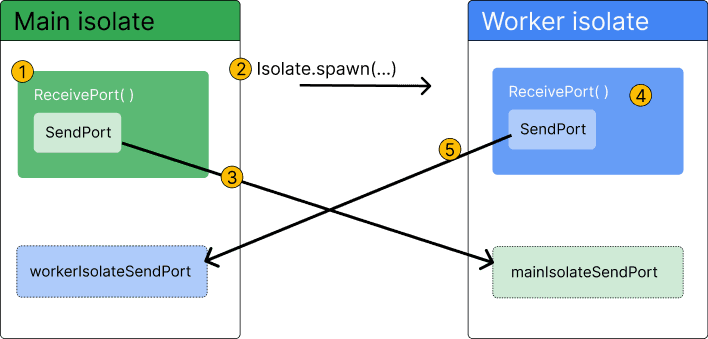
Dart Isolates: True Parallelism Without Shared Memory
Dart isolates provide true parallelism by running code in a separate thread with its own memory. Use them to offload heavy tasks like parsing huge JSON files or complex calculations that would otherwise freeze your Flutter UI.
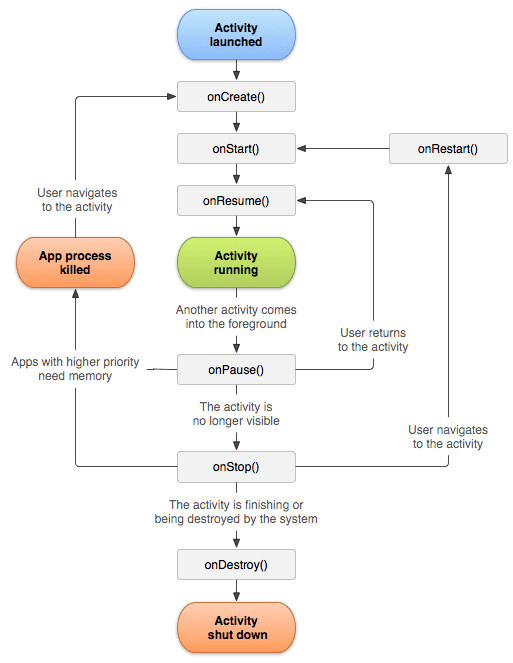
Android Activity: A Single Screen in Your App
An Android Activity is the window for a single screen in your app where users interact with your UI. The OS manages a "back stack" of Activities; starting a new screen pushes one on, and pressing back pops it off.
Nested Navigators: Building Complex UI Flows
Think of nested navigators as UI building blocks, placing one navigator (like tabs) inside a screen of another (a stack). This creates flows like a main tab bar inside a stack for modals.
UICollectionView: Grids, Stacks, and Custom Layouts
UICollectionView is a powerful tool for displaying items in customizable layouts, going far beyond a simple vertical list. Use it for photo galleries or App Store-style interfaces.
Declarative UI: Describe the 'What', Not the 'How'
Declarative UI means you describe your desired UI for a given state, and the framework figures out how to display it. It's the core of modern frameworks like Flutter. The footgun is manually changing UI instead of updating the state that drives it.

Android Intents: The App's Messaging System
An Intent is a message requesting an action from another app component. It's the 'glue' that lets you start new screens, launch background services, or ask other apps to open a URL.
Native Stack Navigator: Native Performance, Less Customization
Native Stack Navigator uses the OS's built-in screen management for smooth, performant transitions. Use it for standard screen stacks where a native look and feel is key.
SwiftUI State and Binding: Owning vs. Sharing Data
In SwiftUI, @State is owning the data, while @Binding is borrowing a key. A view uses @State for its private source of truth, like a toggle's status, and passes a @Binding to child views so they can modify the original source.
We are hiring for this. Every open role lists the topics its interview covers, so you can prepare for the real thing rather than guessing.
See open roles