Everything in Mobile Dev, page 24
Build and validate a login form with Form and GlobalKey
This tests Flutter's declarative form validation. A strong answer covers wrapping fields in a Form, using a GlobalKey<FormState>, calling validate on submit, and acting only on true.
Explain the validator property in TextFormField and what triggers error display
Tests Form validation lifecycle knowledge. Strong answer: validator returns String? error or null; formKey.currentState.validate() triggers all fields; returned string renders as inline error.
How do you retrieve and listen to TextField changes in Flutter?
Use TextEditingController, attach to TextField, listen with addListener, read controller.text, dispose in State.dispose.
Handle taps on a non-button Container: GestureDetector vs InkWell
This tests gesture propagation and Material feedback. Use GestureDetector for raw taps, drags, or scales; InkWell for Material ripples, which needs a Material ancestor. Red flag: InkWell without Material or ignoring GestureDetector drag support.
What problem does IntrinsicWidth solve and what are its performance costs?
This tests Flutter constraints and intrinsic sizing. A great answer covers: capping width to the child's max intrinsic width, aligning Column children, and the speculative pass that costs O(N²) in tree depth. A red flag is omitting performance cost.
Explain Flutter's 'constraints down, sizes up' rule and unbounded height error
Parents constrain down, children size up. ListView in Column throws unbounded height as Column gives infinite maxHeight; fix with Expanded or shrinkWrap.
Describe a strategy for ListView on phones and GridView on tablets
This tests Flutter adaptive layout skills. Use LayoutBuilder or MediaQuery to read screen width, pick a breakpoint near 600 dp, and return ListView or GridView conditionally.
Fix RenderFlex overflow in Row with long truncating text
Wrap Text in Expanded; set overflow to TextOverflow.ellipsis and maxLines: 1; leave siblings unwrapped.
How do Flexible and Expanded differ in a Row or Column?
Tests Flutter main-axis flex constraints. Key point: Flexible uses FlexFit.loose so the child may be smaller than its space share; Expanded uses FlexFit.tight so the child must fill its share.
mainAxisAlignment vs crossAxisAlignment in Column, and textDirection in Row
Tests Flutter flex axis awareness. In a Column, mainAxisAlignment is vertical and crossAxisAlignment is horizontal. In a Row, textDirection governs the main axis, not crossAxisAlignment; verticalDirection governs the cross axis.
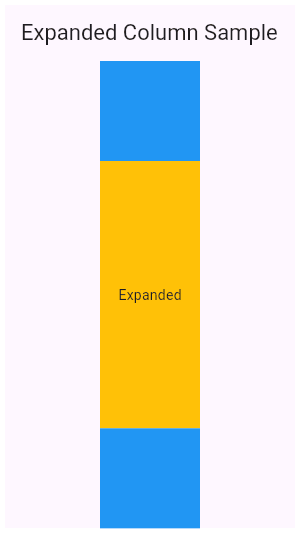
How do you split a Column 1/3 and 2/3 using Expanded?
Tests understanding of flex allocation in Flutter layouts. Strong answers wrap both containers in Expanded, assign flex values of 1 and 2, and note that Expanded forces children to fill the Column's main axis. Red flag: proposing fixed heights instead of flex.
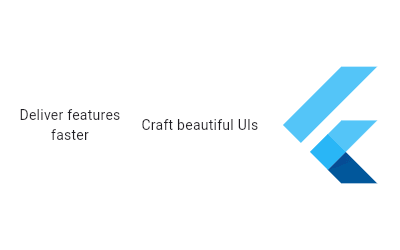
In a Row, how do you space children evenly across the width?
Set mainAxisAlignment to spaceEvenly; contrast with spaceBetween and spaceAround.
How does const on a widget constructor impact build and reconciliation?
Tests widget canonicalization and reconciliation. Strong answers: const creates identical widget instances; Element.updateChild skips subtree rebuild when oldWidget == newWidget, saving elements and GC.
What are Keys in Flutter and why are they critical?
Tests widget identity during reconciliation. Keys let Flutter distinguish moved widgets from changed data; without ValueKeys, ReorderableListView leaves state at old positions, e.g., a checkbox swap. Red flag: calling them performance tools.
Explain the lifecycle of a State object
List initState through dispose, emphasizing didUpdateWidget reacts to parent config changes.
Explain lifting state up with a concrete scenario and benefits
Tests moving state to a common ancestor when siblings share data. Outline: pick two siblings, hoist state to the parent, pass values and callbacks down. Red flag: mutating a sibling via GlobalKey or choosing Provider before proving the parent cannot own it.
How can you prevent unnecessary child rebuilds in Flutter?
Tests your grasp of Flutter build-boundary isolation. Strong answers hit const constructors, extracting the child into its own widget, and granular state selectors. Red flag: saying Keys alone stop rebuilds or recommending RepaintBoundary to skip builds.
What is BuildContext? Give two tree-interaction examples.
Tests if you know BuildContext is an Element handle to a widget's tree location. Strong answers cite Theme.of and Scaffold.of as ancestor lookups, explain the own-context trap, and warn against caching across async gaps. Red flag: calling it the widget itself.
Relationship between Widget, Element, and RenderObject trees and their benefits
Widget configures, Element owns state, RenderObject paints; Element.update reuses the RenderObject, so rebuilds stay cheap.
What is the build method's purpose and key constraints?
It returns a Widget tree, can run every frame, must avoid side effects, and uses BuildContext for inherited data.
We are hiring for this. Every open role lists the topics its interview covers, so you can prepare for the real thing rather than guessing.
See open roles