Easy everything in Android & Kotlin, page 6
Room Database: SQL Made Simple on Android
Room is an abstraction layer over SQLite that lets you work with Kotlin/Java objects, not raw SQL. It's the standard for local data persistence in Android, like caching network data.

Room DAO: Your App's Type-Safe SQL Interface
A Room DAO is an interface that translates your method calls into SQL queries. It's how your Android app's code talks to its local database without writing boilerplate. The footgun is putting business logic in a DAO; it should only access data.
Room Entity: Your Database Table as a Kotlin Class
A Room Entity is a data class that maps to a database table; each object is a row, each property a column. Use it to define your local SQLite schema in Android. The footgun: forgetting the @PrimaryKey annotation, which is required for Room to manage.
Android's UI Layer: Displaying Data, Handling Events
The UI layer is what users see and touch. It displays app data on screen and sends user input like taps to your business logic. It's used in every screen, from login forms to media players.
State in Jetpack Compose: The UI's Memory
In Compose, state is any value that can change over time. The UI is a direct function of this state; when the state updates, the UI automatically redraws (recomposes) to match. The main footgun is not "hoisting" state, which makes components hard to test.
Jetpack Compose Modifiers: Styling Your UI
Think of Modifiers as a chain of instructions that style and add behavior to your UI components. They're used for everything from setting padding and size to handling clicks.
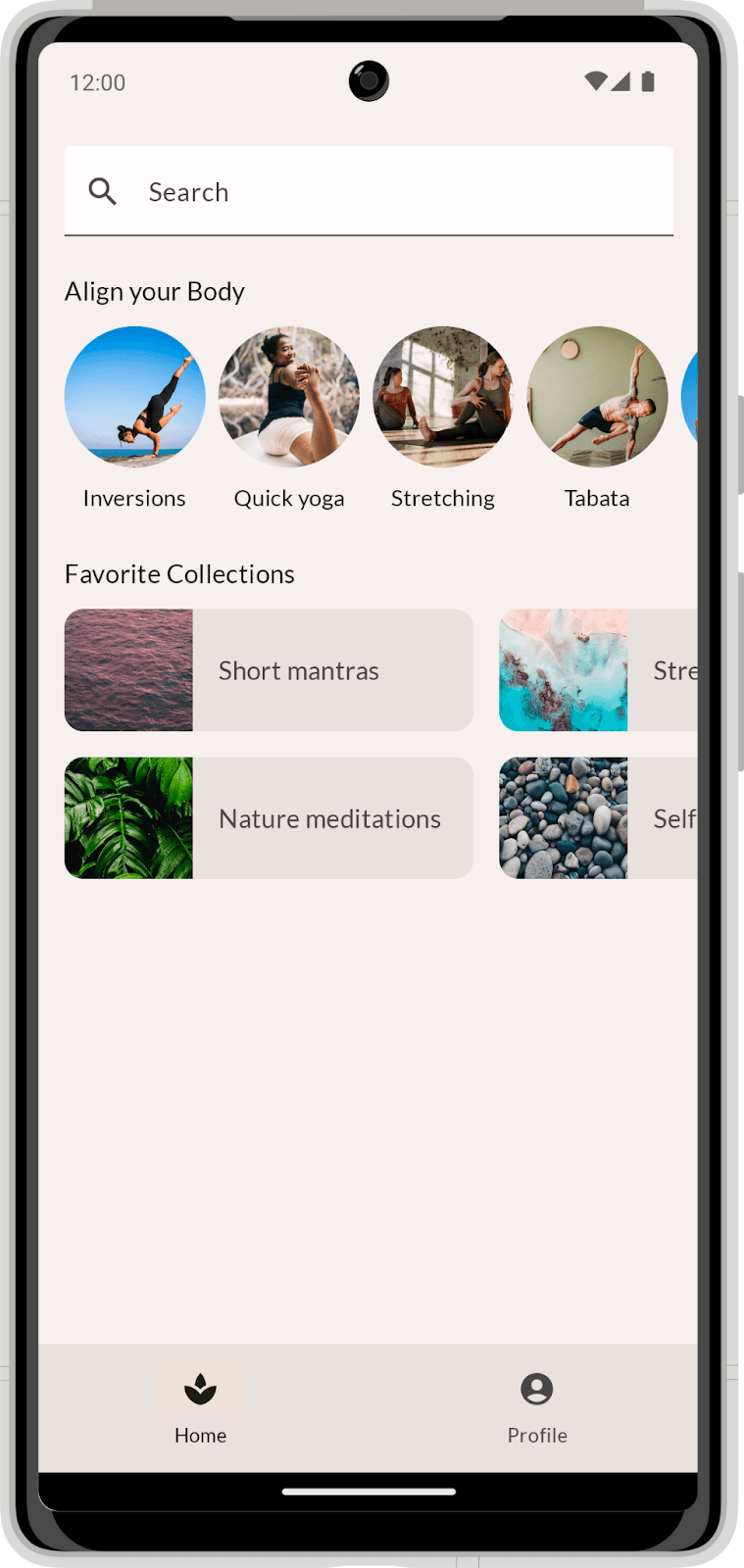
Compose Layouts: Build UI by Describing It
Describe your UI, and Compose draws it. Use Column and Row to position elements, then augment them with modifiers. The footgun is coding before you've broken the visual design into reusable parts, leading to a tangled mess.
Composable Functions: Building UI with Kotlin Functions
Composable functions are Kotlin functions that describe your UI. Instead of creating View objects, you call functions like Text to build a UI tree. They are the core of Jetpack Compose for building Android UIs declaratively.
Handling Android UI Events: Listeners and Callbacks
Think of UI event handling as setting tripwires. You attach a "listener" object to a UI element, and when a user interacts with it, your listener's code (the "callback") is triggered. This is how you make buttons and lists interactive.
View and ViewGroup: The Building Blocks of Android UI
A View is a single UI widget like a button; a ViewGroup is a container that arranges them. This is the fundamental structure for all Android UIs. The common footgun is creating deeply nested ViewGroups, which slows down rendering performance.
Broadcast Receiver: Responding to System-Wide Events
A Broadcast Receiver is your app's antenna for system-wide announcements. It listens for events like network changes or low battery. The main footgun is performing long tasks here; the system will kill it. Offload work to WorkManager.
Android's Activity Lifecycle: A Screen's Journey
Think of an Activity's lifecycle as a stage play's script. Methods like onCreate() and onPause() are cues for your app screen to set up, appear, or hide. This manages state during interruptions like phone calls.

Android Intents: The App's Messaging System
An Intent is a message requesting an action from another app component. It's the 'glue' that lets you start new screens, launch background services, or ask other apps to open a URL.
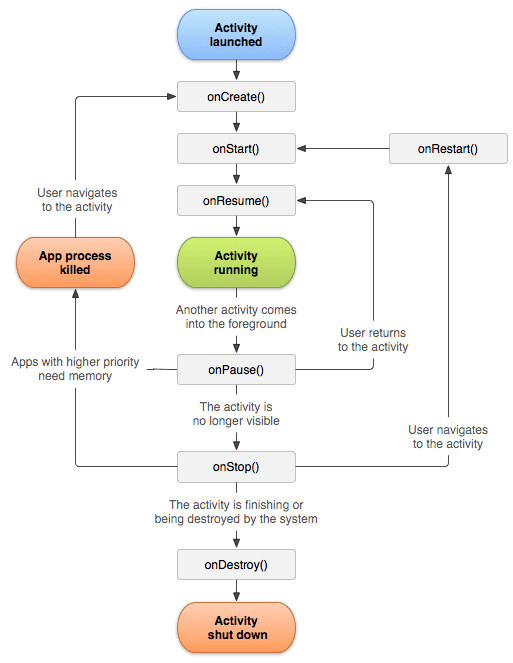
Android Activity: A Single Screen in Your App
An Android Activity is the window for a single screen in your app where users interact with your UI. The OS manages a "back stack" of Activities; starting a new screen pushes one on, and pressing back pops it off.
Logcat: The `tail -f` for Android Apps
Think of Logcat as tail -f for your Android app, streaming system and application messages from a device in real-time. It's your primary tool for debugging crashes, tracking execution flow, and inspecting variable values as your app runs.
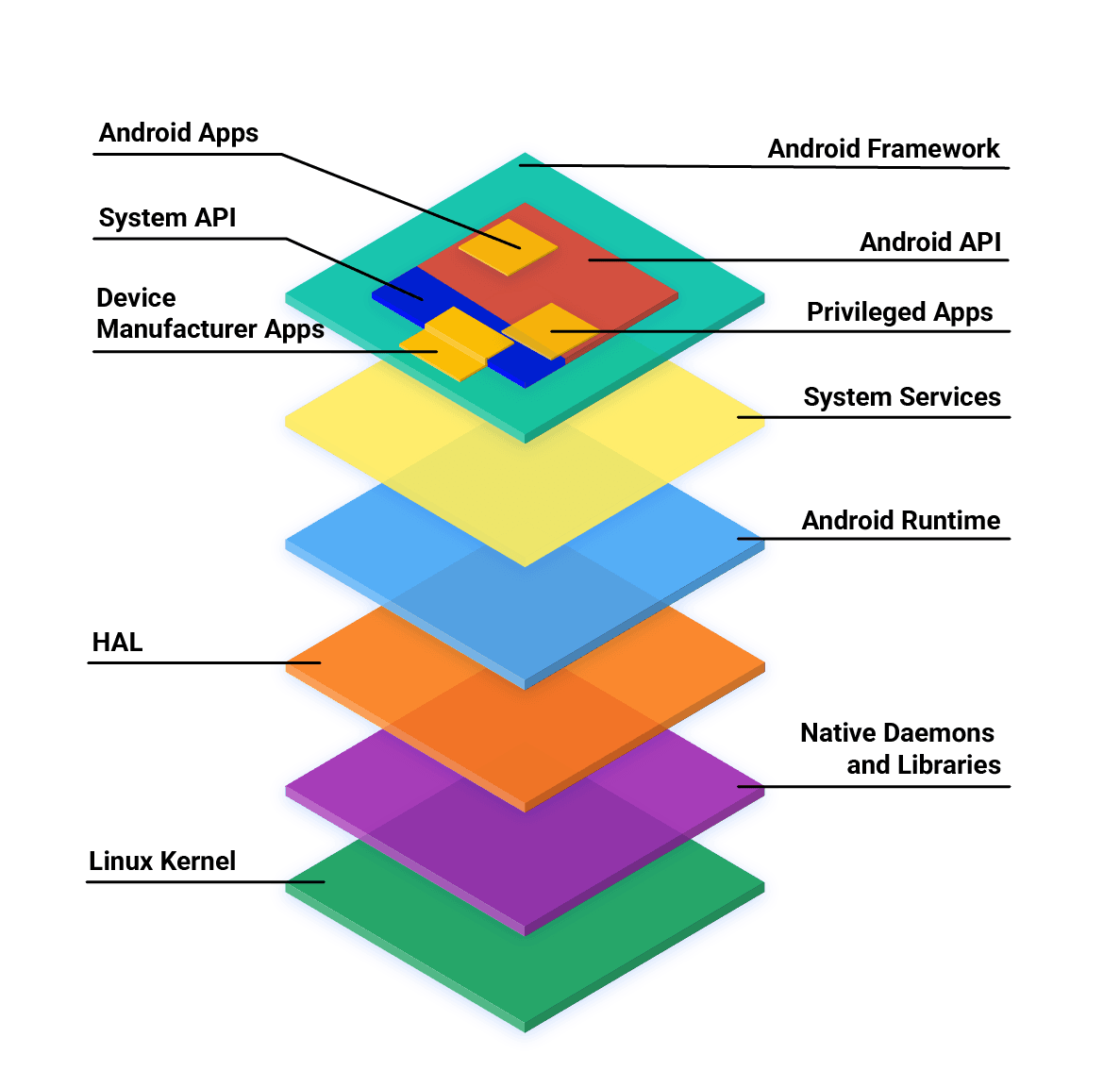
Android App Development: Core Languages and Tools
Android apps are primarily built with Kotlin, Java, and C++ using the official SDK. While other languages are possible, they often need 'glue' code to work and may have restricted API access. The main footgun is assuming any language has first-class support.
AndroidManifest.xml: The Blueprint for Your App
AndroidManifest.xml is the blueprint for your app, telling the OS its components, permissions, and requirements before running any code. A missing declaration here is a common source of runtime crashes, as the OS simply won't see your component.
Android Project Structure: Your App's Filing Cabinet
Think of an Android project as a standardized filing cabinet. It organizes your code, images, and configuration into specific folders so the build system knows where to find everything. This is the foundation of every Android app you build or inspect.
Android Studio: The Official Workshop for Android Apps
Think of Android Studio as the all-in-one workshop for building Android apps. It bundles a code editor, build system, and emulators to write, test, and package software for any Android device. The footgun is underestimating its resource needs.

Kotlin Flow: Asynchronous Data Streams
A Kotlin Flow is like an async Sequence, emitting multiple values over time without blocking. It's used for live data from a database or streaming network responses. The footgun: Flows are cold; the code doesn't run until a collector calls .collect().
We are hiring for this. Every open role lists the topics its interview covers, so you can prepare for the real thing rather than guessing.
See open roles