Everything in DevOps & Cloud, page 54
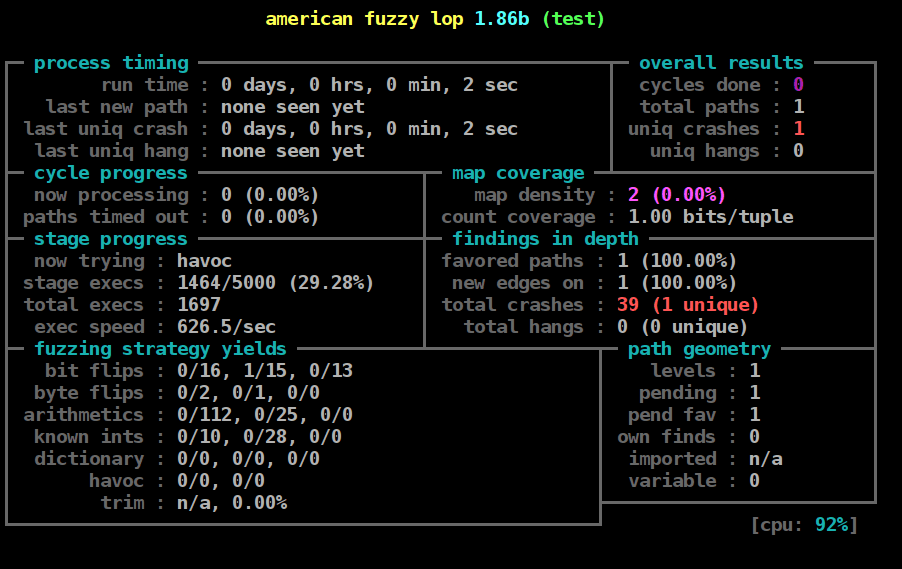
Fuzz Testing: Finding Bugs with Random, Invalid Inputs
Fuzz testing is automated chaos engineering for your inputs. It feeds your program semi-random, invalid data to uncover crashes and security flaws, especially in code that parses files or network protocols.
Software Composition Analysis (SCA): Know Your Dependencies
Software Composition Analysis (SCA) is like checking the ingredient list for your software. It scans the open-source libraries you use for known vulnerabilities, license issues, and outdated versions.
SAST: A Security Spellchecker for Your Code
SAST is like a spellchecker for security, scanning your source code for vulnerabilities before it ever runs. It integrates into your CI/CD pipeline to give feedback on every commit. The main footgun is noise: false positives can overwhelm developers.
Threat Modeling: Thinking Like an Attacker
Threat modeling is thinking like an attacker to find security flaws before they're exploited. It systematically analyzes your system to prioritize defenses against the most likely threats. The footgun is treating it as a one-off task, not a continuous process.

Environment Gating: Automated Go/No-Go for Deployments
Environment gating is an automated checklist for your CI/CD pipeline. Instead of just building code, it checks external signals like monitoring alerts or bug trackers before promoting a release.
Release Orchestration: Air Traffic Control for Deployments
Release Orchestration is the air traffic control for software delivery, coordinating multiple pipelines and teams. It's used for complex launches with interdependent services, ensuring everything deploys in the correct sequence.
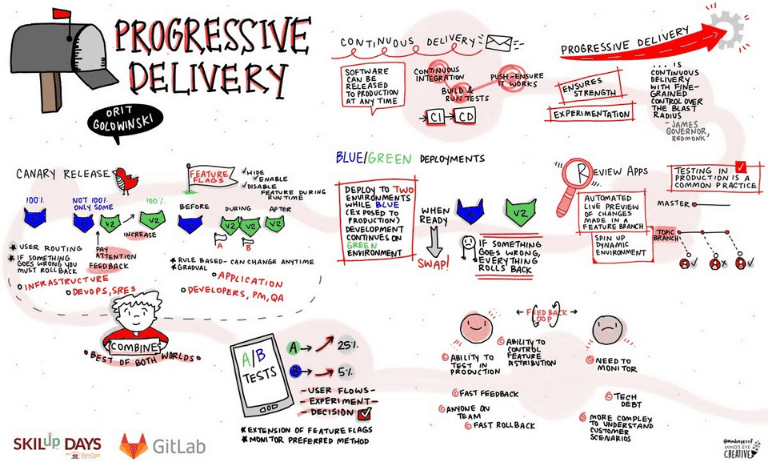
Progressive Delivery: Ship Faster by Reducing Blast Radius
Progressive Delivery reduces release risk by shipping to small user groups before a full rollout, like a soft-opening for new code. It uses canary releases and feature flags to catch issues before they impact everyone.
Deployment Rings: De-risking Rollouts with Progressive Exposure
Deployment rings are like blast shields for software updates, containing a bad release's impact to a small group. They're used in CI/CD to roll out changes progressively, from internal teams to all users.

Shadow Deployment: Rehearsing a Release with Live Traffic
Shadow deployment is like a stunt double for your service: it receives a copy of live production traffic to test a new version without impacting users. Use it to validate performance and find bugs under real load.
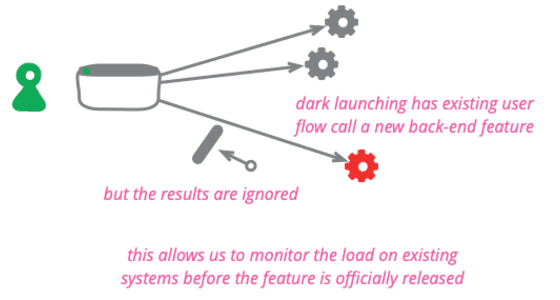
Dark Launch: Test New Code Invisibly in Production
A dark launch tests new backend code on real production traffic without any user ever seeing it. Use it to measure the performance impact of a new recommendation engine or data service before the UI is built.
Traffic Shaping for Safer Deployments
In deployments, traffic shaping isn't about network speed, but controlling user exposure. You route a precise percentage of users to a new code version, slowly 'opening the valve' from 1% to 100% to de-risk the release. This is the engine of a canary deploy.

Kubernetes Health Checks: Liveness, Readiness, and Startup Probes
Kubernetes health checks ask your app: "Are you alive?" (liveness), "Ready for traffic?" (readiness), and "Done starting?" (startup). This lets it automate restarts and traffic routing for zero-downtime deployments.
Deployment Rollbacks: Your CI/CD Undo Button
A rollback strategy is your CI/CD's undo button, letting you revert to a known good state when a new deployment fails. It's essential for production environments. The biggest mistake is not having one, forcing a frantic 'hotfix' under pressure.

Rolling Deployment: Update Servers Without Downtime
A rolling deployment upgrades servers one by one, like swapping train cars while the train moves. A load balancer directs users to active servers, keeping the app online. The main footgun is incompatibility between old and new code running at the same time.
Kubernetes Operators: SREs in a Box
Think of an Operator as an automated site reliability engineer for your app, encoding human knowledge into software. It's used to manage complex stateful applications like databases, automating tasks like backups and upgrades.
CNI: The Universal Plug for Container Networking
CNI is the standard API that decouples container runtimes from network implementations. In Kubernetes, it lets you swap networking plugins like Calico or Flannel.
Service Mesh: The Network Layer for Your Microservices
A service mesh acts as a dedicated network layer for microservices, handling complex communication logic outside your application. It enables features like mTLS and canary releases.
Kubernetes StatefulSets: Stable Identity for Pods
A StatefulSet gives pods a stable, unique identity and persistent storage, unlike a Deployment's interchangeable replicas. Use it for clustered databases or queues where members need stable network names.
Kubernetes Ingress: The Cluster's Front Door
Kubernetes Ingress is the smart receptionist for your cluster. It routes external HTTP/S requests to internal services based on hostnames or paths, letting you expose multiple apps under one IP.
Helm: The Package Manager for Kubernetes
Helm is the package manager for Kubernetes. It uses a packaging format called Charts to define, install, and upgrade applications, making it the standard way to manage software on a K8s cluster. It is a Cloud Native Computing Foundation (CNCF) project.
We are hiring for this. Every open role lists the topics its interview covers, so you can prepare for the real thing rather than guessing.
See open roles